www.inkcups.com   About Us   Contact Us

Posts Tagged ‘Pad printer’

ICN-2200-PSx High Speed Garment Tag Printer

June 14th, 2011 | Author: Stephen
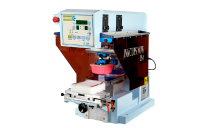
Here is a new video of the ICN-2200-PSx high speed pad printer with a heavy duty pad slide. In this video we show off this pad printers 2 color printing capability. As you can see, the pad slide simplifies positioning of your garment. The slide allows your part to remain stationary therefore assuring a flawless second color print.

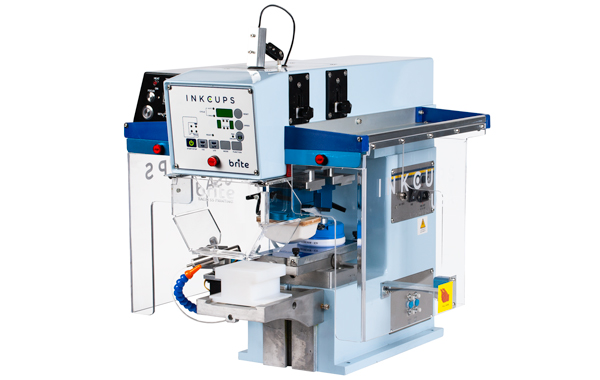
The ICN-2200-PSx is the fastest 2 color garment tag printer on the market! The increased speed is attributed to an independent cup drive system and a shorter plate length. It can print up to 1800 impressions per hour for 2 colors and 2600 impressions per hour for 1 color. The speed can be completely controlled and adjusted to the speed of your liking. This machine saves time and money by increasing production speed and lowering operating costs.

Contact Inkcups Now for more information about the ICN-2200-PSx Pad Printer.

Printer used in this project:
Type: Semi-Automatic Pad Printer
Brand: ICN 2200-PSx
Model: 2 Color High Speed Pad Slide
Standard applications: garment tag printing, pens, stress balls, other metal and plastic parts…
Unconventional applications: cookies, contact lenses
More info: ICN 2200-PSx Pad Printer page


ICN 2200-PSx • The Fastest Pad Printer Ever?

May 26th, 2011 | Author: Stephen
Inkcups Now is proud to introduce the ICN 2200-PSx high speed pad printer. When we say high speed we mean it can print up to 2600 impressions per hour! That’s almost 3 times as fast as other comparable machines. The ICN 2200-PSx is the fastest 2 color semi-automatic pad printer on the market!

What makes this machine so fast?
•The pad slide mechanism
•The independent cup drive
•Reduced stroke on the pad and the cups

Check out the video to see this pad printer in action!

Contact Inkcups Now for more information.

Printer used in this project:
Type: Semi-Automatic Pad Printer
Brand: ICN 2200-PSx
Model: 2 Color High Speed Pad Slide
Standard applications: apparel tag printing, pens, stress balls, other metal and plastic parts…
Unconventional applications: cookies, contact lenses
More info: ICN 2200-PSx Pad Printer page

Add to Technorati Favorites

Technorati tags: , ,


Introducing the ICN-2200PS Pad Shuttle

January 13th, 2011 | Author: Stephen
We proudly introduce the ICN-2200PS 2 color pad printer with pad shuttle. The pad shuttle is so extraordinary because it significantly increases the number of pad impressions (by almost double!) in a shorter time span. In other words, get a lot more done in less time! Now that’s called efficiency!

Here at Inkcups Now we like to think of ourselves as innovators. We are always pushing the bar and bringing you the latest and greatest in printing technology. Our newest innovation, the ICN-2200PS, will yet again change the face of the promotional and tagless printing industry. Watch the video to see the pad shuttle in action!

Printer used in this project:
Type: Two color Pad Printer w/Pad Shuttle
Brand: ICN-2200PS
More info: ICN-2200PS Pad Printer page

Add to Technorati Favorites

Technorati tags: , , , ,


ICN Tips & Tricks: Removing the Ceramic Ring from an Ink Cup without Any Tools!

August 4th, 2010 | Author: Stephen

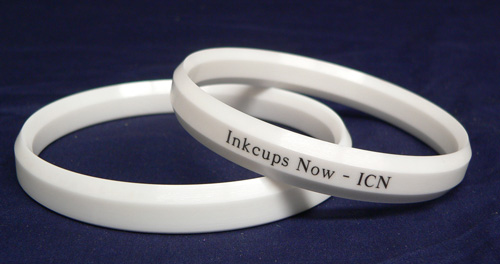
Ceramic Ring and Ink Cup (click to enlarge!)

Ceramic Ring and Ink Cup (click to enlarge!)

Recently here at Inkcups Now we received a phone call from a customer in distress. When the customer placed ink in their ink cup, it would spill out of a small hole on the bottom of the ring. The customer had chipped one of their ceramic rings on his ink cup. The customer did not know what to do next. They didn’t have a replacement ring or a ring removal tool and they had a high production demand. The customer could not wait two or three days for a new ring and ring removal tool.

Our technicians had a fast and easy solution for the customer. Place the ink cup in the freezer. Yes, the freezer. Now this seems a little odd, however it certainly does work. When metal gets cold it shrinks, the colder it gets the more it shrinks. The ring is ceramic, thus the cold will have no effect on it and it will remain the same size. Once the metal shrinks enough (usually after about 2-3 hours), the ring can be removed. BE CAUTIOUS the edges of the ring are extremely sharp and can cut if not handled properly.

Now you must be asking yourself, what about the replacement ring? If the customer didn’t have one on hand how is he supposed to replace the damaged ring? The answer is simple. Flip the ring over. All Inkcups Now ceramic rings are double-sided. Just flip it over and it works as good as new!

Remember, keep the ink cup cold while removing and installing the ring, do not let it warm in between. If the ink cup gets warm it will expand again and the ring will not fit. Also, once you change the ring, let the ink cup sit out at room temperature for about an hour or two in order to allow the metal expand to its original form. Just place the ink cup back into the pad printer and continue printing!

Contact us for more information and other helpful hints.

Add to Technorati Favorites
- – - – - – - – - – - – - – - – - -
Technorati tags: , ,