www.inkcups.com   About Us   Contact Us

Archive for the ‘Pad Printing’ Category

Laser Engraving, Inkjet Printing, Screen and Pad Printing Live Chat on Inkcups.com

February 16th, 2012 | Author: Stephen

Live Chat!

Chat live on Inkcups Now!

The Inkcups.com site has an amazing new upgrade!!!!! Live Chat! Featured on each of our web pages, the live chat button sits on the right hand side of the screen. It is available Monday through Friday 9am – 5pm EST. Visitors have the option to talk to a live expert and get advice instantly! When you see those ICN colors just click to start your chat! Inkcups Now believes in continued innovation for their products and the same can be said about the way in which the company operates. Anything that can be done to bridge the gap between company and customer relationships is a win-win for everybody.

Question about our pad printing equipment or about a particular ink series? We will have a solution for you. The live chat function serves as an excellent medium for communication between Inkcups Now and visitors to the website. We are very excited to have this chat technology be apart of our webpage! We are continually striving to provide the industry’s best customer service from technical experts. Our chat service is not outsourced, you will be chatting with REAL Inkcups Now employees from our headquarters location.

Try out the Chat today! Just visit: Inkcups.com and click on the green and blue chat icon.


Inkcups Now 2011 – A Year in Review

February 15th, 2012 | Author: Stephen

2011 was another monumental year for Inkcups Now! We grew as a company, introduced new products and updates to the market, expanded our presence in the garment tag printing (aka Inkcup Print) market. We have compiled a list of what we accomplished in the past year:

1. WE TURNED 10!
Inkcups Now celebrated its 10th year as a company! Starting out selling ink cups out of his basement, Ben Adner (President and founder) quickly turned this small company into a market leader in 10 short years! Even receiving the honor of being named entrepreneur of the year!

2. INKCUPS NOW EXPANDS THEIR FACILITY
In early 2011 Inkcups Now decided that we needed more space! We were expanding our inventory and simply could not house it all in a single place. We moved our entire ink, thinner and auxiliary line to a state of the art facility. We now have a larger inventory and faster than ever turnaround!

3. INCREASED WORK FORCE
Throughout the year Inkcups Now has obtained new employees in all departments of the company. We expanded our production department, our corporate sector and our sales department. We also have more international sales representatives in Central and South America.

4. INTRODUCED THE ICN-2200PS
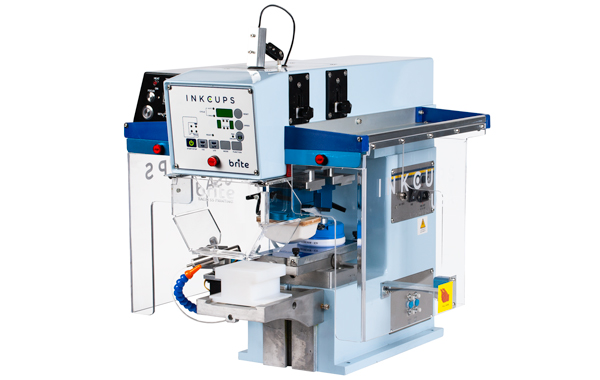
The ICN-2200PS revolutionized 2 color pad printing. The reason why this machine is so effective in printing 2 colors is the fact that the parts do not move, only the pads, ensuring flawless 2nd color registration. The ICN-2200PS is also much faster than typical 2 color pad printing machines. The 2200PS is the most advanced 2 color pad printer on the market.

5. INTRODUCED THE ICN-B150
The ICN-B150, also known as the big brother to the ICN-B100, was an excellent addition to the ICN line of pad printers. This pad printer is a bench top model that now allows users to place in smaller work cells, yet can accommodate images up to 150mm in diameter. A great addition to any print shop!

6. INTRODUCED THE ICN-2200PSx
The ICN-2200PS was a great achievement for Inkcups Now and the printing industry as a whole. However, we managed to increase the speed of the machine by giving it an independent cup drive. The 2200PSx managed to increase the overall speed of the machine by 40%. This is now the fastest pad printer on the market today.

7. CREATED A ROTARY MODULE FOR THE MIMAKI UJF-3042
We built the first and only proprietary head lift system and rotary module for the Mimaki UJF-3042. The head lift system raises the print head to allow it to print on items up to 5 inches in height instead of the standard 2 inches. The rotary module gives the machine the ability to print on cylindrical objects, 360 degrees around.

8. NEW PLATE MATERIALS
We introduced new plate materials to the market for pad printing. Our premium orange laser plates are perfect for garment tag printing. Our gold plate material is great for doctoring because it has such a smooth glossy finish.

9. NEW TOUGHCUP
We redeveloped our ToughCup coating for the VersaCup Inkcup to be as tough as ever! The new coating even resists ink. The ink can literally sit over 48hours and harden inside the cup, no matter what the ink can be removed with just a single paper towel. A lot of companies have tried to introduce “green” products this year, Inkcups Now, however was the only one to truly succeed because there is no need to use chemicals and there is nothing to throw away.

10. SILICONE INK
Inkcups Now had begun selling a silicone ink that will adhere to any silicone material. The ink is available for pad printing and screen printing. The silicone ink can withstand extreme temperatures and will not crack or peel when bent.

What’s to come????
We plan on having another stellar year! We are going to continue to grow as a company. We are going to introduce a whole line of new machines, modifications to old machines, and continue to provide the best customer service in the industry.

What do you most want to see from Inkcups Now in 2012?


Image Sizing Template for Pad Printing Ink Cup

December 7th, 2011 | Author: Stephen

Laser Etching Artwork Template

Laser Etching Artwork Template (Click to enlarge)

Here at Inkcups Now (ICN), we are always working to make the lives of our customers easier. One less thing to worry about is always a great thing! We have created two artwork sizing templates to ensure your image will fit within the diameter of the ink cup. One template is designed for use with 90mm ink cups, the other is for larger 150mm ink cups. Each cup is for use within a standard pad printing machine.

Simply open the attached file in adobe illustrator or any other artwork programs to use the template. If the image does not seem to fit, contact an ICN technician, they are always happy to help!


Recommended Ink cups to use in this Project:

ICN VersaCup (available in 90mm or 150mm in size)
Updated ToughCup coating is also available:
Ink resistant coating! No more chemicals to clean your cup.
For more information about Ink cups from Inkcups Now, visit: Inkcups.com/Inkcups

Download the 90mm Sizing Image:
EPS Download

PDF Download

Download the 150mm Sizing Image:
EPS Download

PDF Download


ICN Creates Custom Part Fixture for Pad Printing

December 1st, 2011 | Author: Stephen

Part Fixture

Pad Printing Part Fixture (click to enlarge)

Inkcups Now is a company of many services, one of which is creating a custom part fixture for pad printing. Our engineers can create a fixture based upon a customer’s specifications or, as in this instance, create one from molding the part. ICN’s custom molds are intended to fit your part flawlessly in order to prevent it from moving while printing.

Not only does Inkcups Now create mold style fixtures, our engineers can also create metal or acrylic fixtures that are 100% unique to your parts specifications. Fixtures are also available for screen printing and inkjet printing along with pad printing. Fixtures are a great way to ensure flawless print registration on each part consistently. Fixtures allow for faster loading and unloading of parts and potentially maximize the amount of parts per fixture.


Can I Etch Laser Plates with my CO2 Laser?

September 12th, 2011 | Author: Inkcups Now

Laser Engravable Pad Printing Plate
“Can I Etch Laser Plates with my CO2 Laser?” – This is a very common question we get from pad printing companies. Indeed, if a company already has a robust laser engraver, it may be able to enjoy the benefits of fully digitized pad printing plate-making – simply by purchasing the laser plate material and getting some instruction.

The short answer is as follows: you are likely to get the best results with laser plates if the wattage of your CO2 laser engraver is between 10Watt and 20Watt, and no more than 30Watt.

The longer answer is this:

  1. If your laser has more than 30Watt, you may still get excellent results with the Acculaze plate material, which is designed to handle fine-line graphics only (does not work for bold fonts or open etch areas). To etch Acculaze with a 30+Watt laser engraver, use the lowest power setting and make 2 passes.
  2. For the Imperial and Laser Orange plate material (both of which can handle any type of graphics) you do need the laser wattage to be no more than 30Watts; 10Watt – 20Watt is usually best. With a more powerful laser, the beam diameter (spot size) of the laser is too large to achieve fine etch and sharp prints.
  3. The other major factor that comes into play is your CO2 laser’s software: it will determine how well you can manipulate your graphic files.
  4. Test your laser! We offer laser plate samples and etching guides.
  5. Consult with Inkcups Now specialist to determine if investing in one of our specialized laser engravers and plate-makers is the right solution for you.


Photopolymer Plate Making Exposure Times for Large or Small Logos

August 2nd, 2011 | Author: Stephen
Photopolymer Plates

Photopolymer Plates in Exposure Unit


While garment tag printing, most users prefer making their own plates. Typically the most inexpensive way to etch your own plates is by using photopolymer plates with an exposure unit. Etching an image into photopolymer plates requires more attention than laser etching the plates, exposure times will vary depending upon the image size, even if the same plate material is used for both large and small images.

Inkcups Now has done extensive testing with our water wash orange plate material, our most popular for garment tag printing. Larger images need more time to develop during the washout process to provide the depth necessary for garment tag printing.

 
B100 (small image)
150 (Large image)
Film Exposure
1:00
0:55
200 Line Screen Exposure
0:20
0:10
Washout
1:00
1:30
Bake Time @ 170°F
20:00
20:00
Post Cure
20:00
20:00

New to photopolymer plate-making? Click here to check out a complete photopolymer plate-making training video.

Plates used in this project:
Type: Photopolymer Plates
Brand: ICN
Model: Water Wash Orange
Standard applications: Promotional products, Garment Tag Printing
Photopolymer plate alternative: Laser Plate Making.


How to Load Photopolymer Plates and Ink Cups into Your Pad Printing Machine

July 20th, 2011 | Author: Stephen

Pad Printing Machine

The cup and plate in a pad printing machine (click to enlarge)


Inkcups Now takes pride in offering the best technical support in the industry. If you own a pad printing machine, weather you use it for printing on promotional products or garment tag printing, proper loading of the plates and cups into the machine is key to getting a great print. The following is a 5 step procedure that will ensure proper plate and cup installation.

1. Thoroughly clean the magnetic sub-plate and back of print plate.

2. Make sure the plate is laying flat on top of the sub-plate. While applying pressure to the center on the plate, finger tighten the hold-down knobs on one end, then repeat on the other end. DO NOT OVER-TIGHTEN or you may distort the plate and cause doctoring problems

3. Putting the cup and plate together:

• Clean the ring edge before putting on plate (every time.)
• Always place the ink cup gently on the plate at the end opposite to the image area.
• OPEN THE VENT PLUG BY TURNING COUNTER-CLOCKWISE – let it sit for a minute, then re-tighten. This lets air out of the ink cup and enables the ring to set properly on the plate.

4. Putting the locking pin into the ink cup

• Slide the locking pin up and down several times and move the cup manually (rotate the cup, do not push) to make sure there is no interference between cup and pin.
• Make sure the pin is not seated directly on the bottom of the hole.

5. After the machine sits idle

• Before turning on the machine, manually break free the cup from its location on the plate. This is done in case the ring has settled into the plate material which would result in damaged plates when the machine cycle is initiated

Contact Inkcups Now for additional information!

Printer used in this project:
Type: Pad Printer
Brand: ICN
Model: B100, B150, 2200(PS, PSx)
Standard applications: Bottles, Garment Tag Labels, Cups, Mugs…
More info: ICN’s Pad Printer page


ICN-2200-PSx High Speed Garment Tag Printer

June 14th, 2011 | Author: Stephen
Here is a new video of the ICN-2200-PSx high speed pad printer with a heavy duty pad slide. In this video we show off this pad printers 2 color printing capability. As you can see, the pad slide simplifies positioning of your garment. The slide allows your part to remain stationary therefore assuring a flawless second color print.

The ICN-2200-PSx is the fastest 2 color garment tag printer on the market! The increased speed is attributed to an independent cup drive system and a shorter plate length. It can print up to 1800 impressions per hour for 2 colors and 2600 impressions per hour for 1 color. The speed can be completely controlled and adjusted to the speed of your liking. This machine saves time and money by increasing production speed and lowering operating costs.

Contact Inkcups Now for more information about the ICN-2200-PSx Pad Printer.

Printer used in this project:
Type: Semi-Automatic Pad Printer
Brand: ICN 2200-PSx
Model: 2 Color High Speed Pad Slide
Standard applications: garment tag printing, pens, stress balls, other metal and plastic parts…
Unconventional applications: cookies, contact lenses
More info: ICN 2200-PSx Pad Printer page


Printing Pad Problems? We have the Solutions!

June 8th, 2011 | Author: InkcupsNow
overcompressed printing pad (click to expand)

Over-compressed Printing Pads (Click to Expand)

Ever found yourself in middle of a production run only to discover that your printing pad suddenly split in two? Most people would think there is something wrong with the pad itself, hoping that a new pad will do the trick. When the same problem occurs over and over, its time to find out what’s really going on.

Looks familiar? This picture was sent in by a customer who had no idea why his pad printing pads kept splitting. It was not the ink, not the surface of the substrate he was printing on or poor handling of the pad – Eventually we found out that it was the settings of his machines that led to a serious case of over-compression of the pad.

Read more


ICN 2200-PSx • The Fastest Pad Printer Ever?

May 26th, 2011 | Author: Stephen
Inkcups Now is proud to introduce the ICN 2200-PSx high speed pad printer. When we say high speed we mean it can print up to 2600 impressions per hour! That’s almost 3 times as fast as other comparable machines. The ICN 2200-PSx is the fastest 2 color semi-automatic pad printer on the market!

What makes this machine so fast?
•The pad slide mechanism
•The independent cup drive
•Reduced stroke on the pad and the cups

Check out the video to see this pad printer in action!

Contact Inkcups Now for more information.

Printer used in this project:
Type: Semi-Automatic Pad Printer
Brand: ICN 2200-PSx
Model: 2 Color High Speed Pad Slide
Standard applications: apparel tag printing, pens, stress balls, other metal and plastic parts…
Unconventional applications: cookies, contact lenses
More info: ICN 2200-PSx Pad Printer page

Add to Technorati Favorites

Technorati tags: , ,